Bitmap Font Generator
This program will allow you to generate bitmap fonts from TrueType fonts. The application generates both image files and character descriptions that can be read by a game for easy rendering of fonts.
The program is freeware and open source, but a donation is greatly appreciated.
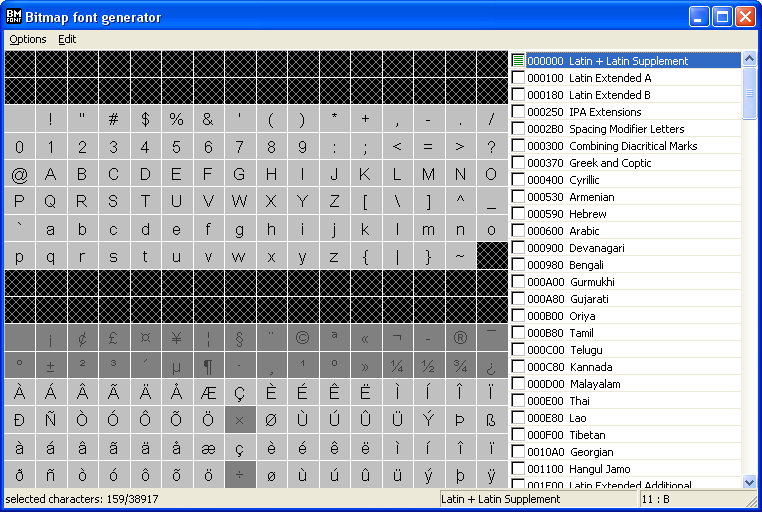
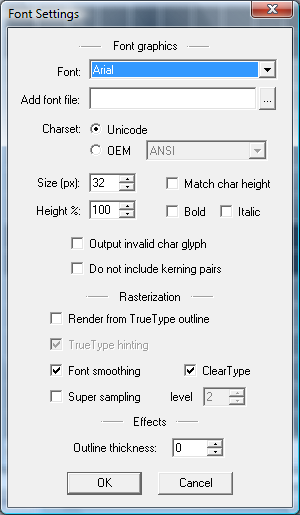
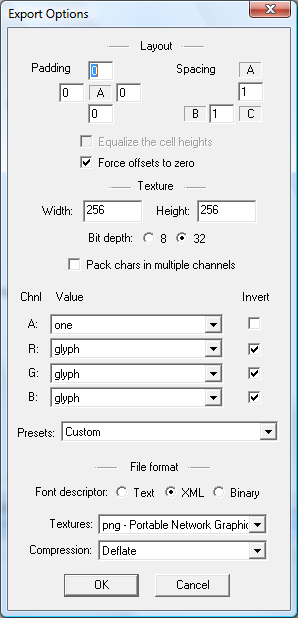
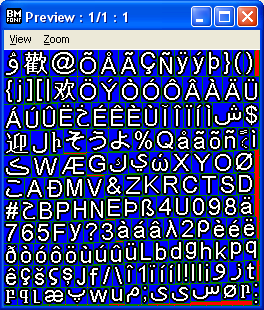
If you don't have an image viewer capable of reading TGA, PNG, or DDS files, I recommend PUPP, another free product from AngelCode.
Downloads
download 32bit & 64bit executable for v1.14a (1.28MB, 2021/04/08)
download 64bit executable for v1.14b beta (743KB, 2025/08/16)
Features
- Support for complete Unicode 13.0 character set, as well as 8 bit OEM character sets
- Optimal use of texture space, i.e. as little unused area as possible
- Support for kerning pairs
- Easy to use file format, either normal text file or xml files. Binary format is available for those that prefer that
- 8bit or 32bit texture output (TGA, PNG, and DDS files)
- Option for packing 4 layers of font images into 1 32bit texture. Needs special shader to render with, but saves a lot of memory
- Anti-aliasing, both through Windows native font smoothing and super sampling
- Configurable padding and spacing between characters
- Select characters from text file, supports both UTF8 and UTF16 encoded files
- Generate bitmap font from command line
- Import colored images as characters, supports: bmp, jpg, tga, dds, png
- Optional outline to font characters
- Optional packing of characters with outline into 1 channel. Needs special shader to unpack during rendering, but saves a lot of memory
- Use TrueType fonts directly from the file without installing them first
- Autofit font size for target texture size
Documentation
The manual is included with the tool, but for those who wish to take a look at it without installing the tool first it is also available here. The manual describes both how to use the tool and the file format of the generated files.
Source code
The source code is available under the widely known zlib license. The svn repository is hosted at SourceForge.net
Get the code by pointing your svn client at: http://svn.code.sf.net/p/bmfont/code/trunk.
If you want any support with the code, then please visit the forums.
Observation on virus alert
Avira anti-virus has been known to give a virus alert when scanning bmfont.exe or the installer. This is a false positive generated by their heuristic functions that tries to predict and catch unknown viruses. I've already reported this false positive to Avira a few times and each time they recognize it as a false positive, however for some reason the problem comes back months later (presumably when they update the heuristic functions).
If anyone has any idea what I need to change in the code to prevent this false alert I would very much like to know.
Tutorials & Resources
Here are a some links to other resources that provide information or tools that are useful for those interested in bitmap fonts.
- Bitmap Fonts by Andreas Jönsson
- Bitmap Fonts by Chad Vernon
- Quick tutorial: Variable width bitmap fonts by Promit
- BMFont OpenGL Implementation by legolas558
- bmfont BlitzMax module by Mike Wiering
- C# XML serializer for font loading by DeadlyDan
- C# XML BMFont reader by Antoine Guilbaud
- BMFont to C source code converter by Lars Ole Pontoppidan
- Discussion on legality of bitmap fonts
- Tool for converting bitmap fonts into distance fields
- Another tool for converting bitmap fonts into distance fields
- PlayOnLinux - can be used to run BMFont on Linux
- GlyphCombiner - a Mac OS X tool by Binary Blobs for combining multiple bitmap fonts into a single atlas
- rust bmfont descriptor parser library by shampoofactory
- Adding colored outline and drop shadow in gimp - by rukh
The following are some other tools that also generate output in the same format that I came up with for BMFont and that is widely used in the industry today.
- Littera - free web application
- Glyph Designer - paid app for Mac
- ShoeBox - free tool written with Adobe Air
- Hiero - open source tool written in Java
Changes
- 1.14b beta - 2025/08/16
- Fixed performance issue in UI when moving mouse over the character grid in ANSI mode.
- Fixed horizontal clipping and incorrect xadvance on some glyphs in ANSI mode when not rendering from true type outline.
- Fixed 'Select all chars' in ANSI mode that didn't select all 256 characters after starting the application in Unicode mode.
- Fixed bug with auto-fitter that applied the adaptive padding even when auto-fitting was turned off.
- Fixed bug with reading Unicode strings from the commandline of bmfont.exe.
- 1.14a - 2021/04/08
- Fixed bug when invalid char glyph doesn't fit when using auto-fitting.
- Included both 64bit and 32bit builds in the package.
- 1.14 - 2021/01/05
- Fixed crash with large fonts when Windows API incorrectly reported negative width for glyphs.
- Improved handling of out-of-memory conditions.
- Fixed crash that could occur when exporting unicode characters above 0x10000 with kerning pairs.
- Fixed crash when command line argument -c was a relative path and the configuration included font file or image files.
- Fixed crash when saving configuration file with added font file from the same directory.
- Corrected the cell height when using fixed height and supersampling.
- Fixed compatibility with Windows XP.
- Fixed scaling issues and cropping when using height scale with render from outline.
- Fixed application freeze when generating very large fonts.
- The source code is now available under the zlib license.
- Converted application to compile for Windows with Unicode to better support file and font names with international characters.
- Updated libpng to 1.6.19.
- Updated zlib to 1.2.8.
- Updated libjpeg to 9a.
- Updated libsquish to 1.13.
- Fixed a problem with exporting glyphs for some international languages.
- Added support for Unicode 13.0.
- A 64bit build is now available to support huge bitmap fonts that require more than 2GB of memory to generate.
- The default glyph for invalid characters is now properly rasterized when not rendered from outline too.
- The status bar now shows the glyph id for the characters.
- Fixed corrupt glyphs when rendering very large fonts (1000+ px) from glyph outline.
- Added autofit that automatically determines the max font size that fits in defined texture size.
- Fixed crash on startup if default font doesn't have the Unicode chars in range 0-255.
- Added support for file paths with Unicode characters.
- Improved support for kerning pairs in true type fonts that store them as ranges.
- 1.13 - 2012/08/12
- Added option to export fonts using fixed cell heights for easier post processing.
- Improved support for exporting kerning pairs for true types that use the GPOS table instead of KERN table.
- Kerning pairs are no longer exported for char ids that have been overridden with imported icons.
- Improved glyph packing when there are large out of proportion images.
- The final texture no longer has boxes around glyphs when a channel is inverted or set to one.
- Fixed subpixel clipping in supersampled glyphs.
- Implemented an alternative glyph rasterization based on the true type outline.
- The rasterization from true type outline doesn't clip glyphs that extend above or below cell height.
- Allow disabling hinting when rasterizing from true type outline.
- Re-added option for rendering with ClearType with native Windows font engine.
- Fixed bug where saved XML format sometimes didn't close the 'kernings' tag if there were no kerning pairs.
- Fixed bug with duplicate kerning pairs in non-unicode font output.
- Fixed problem where double-clicking in file dialog would sometimes change the selected characters under the mouse.
- Enabled run-length encoding for TGA output.
- Added option to force xoffset and yoffset to 0, and xadvance to width.
- It's now possible to open the app directly with a configuration file from the file explorer.
- When loading a bmfc file the characters are now selected accordingly.
- The font dialog no longer lists rotated fonts, i.e. those prefixed with @.
- Added support for working with a font from a file so it is no longer necessary to install it first.
- Imported images are now stored with a relative path in the configuration file.
- Fixed clipping that could occur on left and right edges when generating a font in italic mode.
- Kerning pairs can now be optionally left out in case they are defunct in the TrueType font.
- The save and load configuration dialogs will now initiate where the last configuration file was loaded or saved.
- 1.12 - 2009/08/02
- Added presets to the export options to aid choosing the correct values for the texture channels.
- Fixed bug when generating font from command line where the page files in the font descriptor would have the incorrect name.
- Added ability to invert individual texture channels for more export options.
- Added command line tool that will wait for the generation to complete before exiting.
- Fixed the yoffset when the font height was scaled.
- Fixed bug in select chars from file for non-unicode with characters above ASCII 127.
- The number of digits for the page id in the texture files is now adapted to the number of generated pages.
- Added support for adjusting xoffset, yoffset, and advance for imported icons.
- 1.11b - 2009/03/08
- Fixed a bug in the select chars from file with UTF16 encoded files.
- Fixed a bug in the packing routine that could make characters overlap in rare situations.
- Fixed the selection of unicode ranges by clicking on the check mark in the list.
- 1.11a - 2008/12/06
- Fixed the subpixel misalignment in the glyph height caused by supersampling.
- Worked around a bug in GDI where the returned glyph height is smaller than the actual glyph bitmap.
- 1.11 - 2008/10/11
- Fixed a freeze that could happen while selecting characters from file.
- Fixed cropping in some true type fonts.
- Fixed the 'Select All Chars' option in ASCII mode.
- Added option 'Output invalid char glyph'.
- Removed the 'Disable unavailable chars' option.
- Fixed problem where characters not defined in the unicode standard could be selected when selecting chars from file.
- An indicator is now displayed in the character grid where images are imported.
- Fixed bug where main window is moved behind other windows when closing image manager.
- Fixed bug where cancelling the icon image dialog would still effectivate the changes.
- It's now possible to select font size by character height, rather than line height.
- 1.10b - 2008/06/15
- Fixed the channel indicator in the font descriptor for colored icons.
- Fixed cropping of characters in small fonts.
- Fixed bug with black 8bit textures when the check box for pack chars is checked.
- 1.10a - 2008/06/08
- Corrected the documentation in regards to the block size value in the binary file format.
- Fixed a bug with the 'Select chars from file' where some character might be skipped between reading blocks of 1kb.
- Fixed a rounding problem with supersampling that made the exported line height be one less than the largest character height.
- Removed the external dependency on the Microsoft DLLs.
- Upgraded libpng to 1.2.29.
- 1.10 - 2008/05/11
- Selecting characters from file now supports both UTF-8 and UTF-16, with automatic detection via byte-order-mark.
- Fixed a bug where unicode subsets where not shown when disable undefined characters was unselected.
- Status bar shows character id for the character under the mouse cursor.
- Added ""clear all"" option.
- Preview window is now automatically resized to fit the texture when scaling.
- Added support for unicode characters above 0xFFFF.
- Added support for generating textures with DXT1, DXT3, and DXT5 compression.
- Split the font settings dialog in two dialogs, one for the font graphics and one for export options.
- The content of each texture channel can now be customized.
- File format updated to accomodate new feature.
- 1.9c - 2007/11/16
- Fixed the reversed spacing values in the font settings dialog.
- The font generation can now be aborted while the characters are being added to the texture.
- Greatly improved the speed of generating textures.
- 1.9b - 2007/10/28
- Fixed the padding
- Improved documentation
- 1.9a - 2007/09/16
- Allowing unicode for all fonts, even fonts that have only one code page
- Fixed the status messages when generating fonts
- 1.9 - 2007/08/19
- Added support for importing colored icons
- Supported input image formats are: bmp, tga, png, jpg, dds
- Added support for giving a black outline to characters
- Characters with outline may be encoded in 1 channel to save space
- Outline is generated with rounded corners
- Increased the binary file version because there is new information
- 1.8c - 2007/01/25
- Fixed a bug where the font saver got confused with the 4 chnl packed flag set, even though saving in 8bit format
- 1.8b - 2007/01/06
- Fixed kerning amount in binary file format when using super sampling
- 1.8a - 2006/11/23
- Fixed alignment bug with 8bit TGA and DDS files with non-power-of-4 widths
- Fixed crash on Windows with installed Input Method Editors, e.g. Japanese and Chinese Windows
- 1.8 - 2006/11/11
- Added support for binary font descriptor file
- Added support for saving PNG texture files
- The application now remembers the configuration from last execution
- Improved useability for selecting characters in unicode mode
- Added option to select all characters from a text file
- Kerning pairs with amount 0 are no longer output
- XML font descriptor file now groups the pages, chars, and kerning pairs
- The font configuration can be saved to disk, and later reloaded
- Added support for generating fonts via command line using a saved configuration.
- Added support for saving DDS texture files (no compression)
- 1.7a - 2006/09/12
- Fixed the creation of non-unicode fonts
- 1.7 - 2006/09/08
- Added the standard xml header
- Added support for unicode charsets
- Added the option to pack monochrome characters into each of the 4 channels of a 32 bit texture
- Added tag with texture file names in the font descriptor file
- The generation of textures is now done in a background thread
- 1.6 - 2006/02/18
- It's now possible to choose between XML and text for the format of the font descriptor file.
- Fixed kerning sizes with super-sampling
- 1.5 - 2005/10/01
- Implemented stretching so that fonts can now be non-uniformly scaled (only works on Win2K or later).
- 1.4a - 2005/08/26
- Non-TrueType fonts, such as Script and System, are now supported as well.
- Minor fix to rendering when padding is used.
- 1.4 - 2005/07/17
- The preview window now shows the page number in the title.
- Characters without a defined glyph may now be automatically removed (only works on Win2K or later).
- Kerning pairs are now saved as well.
- Added support for chooseable charset, e.g. arabic and hebrew fonts.
- 1.3 - 2005/05/08
- Added support for italic fonts.
- Application no longer crashes when visualizing with no characters selected.
- 1.2 - 2005/03/09
- User can now choose to generate the bitmap font with or without font smoothing.
- Font smoothing is now done without ClearType, so that artifacts are no longer generated in the output texture.
- Added program icon.
- 1.1 - 2005/03/05
- User can now choose to save in 32bit and 8bit TGAs.
- The spacing between characters can now be manually set.
- Fixed the bug where some fonts weren't visible in the font list.
- 1.0a - 2004/11/27
- Fixed a problem with values that where not adjusted to compensate for antialiasing level.
- 1.0 - 2004/02/14
- First public version.
Special thanks to
Work in Progress
Some of the things that will be implemented in future versions:
- Improved font generation
- Support for drop shadow.
- Support for blurring.
- Colored glyphs.
- Improve the useability.
- Add a help command that opens the manual installed with the application
- Add tooltips for dialogs and controls
- Selecting characters from a file could support a drag-and-drop interface.
- Importing images over characters could also support a drag-and-drop interface.
- Add logfile output for missing glyphs when scanning text files for used characters.
- Allow selecting font from the windows common font dialog
- Add font preview
- Allow user to write text and see the outcome. It should be possible to encode special characters as icons are usually imported over non-visible glyphs
- Improve icon import
- Allow importing grayscale images into a single channel, rather than full 32bit.
- Warn if imported icon is larger than output texture.
- Context menu in character window to import directly to a specific character.
- Add plugin support for output formats.
- Allow the plugins to format both font descriptor and image files.
- Signed distance fields for improved quality zooming on bitmap fonts. Here's a tool that convert BMFont output to distance field fonts.
- option for exporting with pre-multiplied alpha
- Support multiple fonts and different font sizes in a single output.